How to Build an AI Property Research Agent with UK APIs
Build an AI property research agent on structured UK property APIs, with tool controls, source timestamps, confidence checks and human review.

An AI assistant can write a fluent property summary from a few search results. Fluency is not the hard part. The hard part is ensuring it researched the correct property, used current structured sources, distinguished facts from estimates and did not fill a missing field with a plausible guess.
An AI property research agent should use a small set of controlled tools rather than unrestricted access to every endpoint. It should preserve source dates and warnings, apply a cost limit and require human review before financial, legal or customer-facing decisions.
This guide describes a practical architecture using the Property Insights API and MCP-compatible property tools.
Why structured tools matter
Web pages are useful for general context, but property research often needs exact fields: a UPRN, certificate date, sold transaction, Council Tax year or valuation confidence. A language model asked to extract those from snippets can select the wrong flat, use an old page or mix several properties.
A structured tool provides:
- Defined inputs.
- Validated property identifiers.
- A predictable response schema.
- Source and billing metadata.
- Explicit not-found and unsupported states.
- Auditable tool calls.
The model can then concentrate on choosing the right tool, explaining the evidence and asking for clarification. It should not invent the data layer itself.
Property Insights exposes tools for analysis, valuation, UPRN address lookup, boundary, information packs, Council Tax, EPC, sold comparables, sold prices, area context, connectivity, planning constraints, schools and market data. Start with the minimum subset needed for the agent's job.
Define a narrow research job
"Research any property" is not a production specification. Define the audience, input, output and stop conditions.
For example:
Given a confirmed UK residential address and asking price, produce a first-pass investor briefing with recorded property facts, recent comparable evidence, an automated valuation range, Council Tax and EPC context. Flag missing data and do not give legal, tax or lending advice.
That statement identifies:
- Required input: confirmed address and asking price.
- Intended user: investor performing a first pass.
- Required evidence: property facts, comparables, valuation, Council Tax and EPC.
- Limit: no legal, tax or lending advice.
- Expected behaviour: flag missing data.
Write a fixed output schema as well. A stable JSON structure is easier to test than open-ended prose.
{
  "property": {},
  "facts": [],
  "estimates": [],
  "comparables": [],
  "warnings": [],
  "sources": [],
  "review_required": true
}
The final customer summary can be generated from that checked structure.
Resolve the property before research
The agent should not call five tools on an unconfirmed free-text address.
Use this sequence:
- Validate that address and postcode are present.
- Call the UPRN address tool.
- Present the canonical match.
- Ask the user to confirm ambiguous units.
- Store the UPRN and canonical address in agent state.
- Pass that identity into supported downstream tools.
If the address cannot be resolved, stop and request better input. Do not let the model choose a neighbouring property because it has more data.
For multi-title boundary results, the agent should present the candidates and ask the user to choose. A title decision is not a language-generation task.
Give the agent the minimum tools
Each tool increases the agent's action space, cost and security surface. An investor briefing may need:
uprn_address_lookupproperty_analysisproperty_valuationproperty_sold_comparablesepc_searchcouncil_tax_property_lookup
It may not need company ownership, batch area exports or information-pack creation. Keep consequential actions such as generating a charged PDF separate and require explicit confirmation.
Use clear tool descriptions that state:
- What the tool returns.
- Required and optional inputs.
- Geographic coverage.
- Credit cost or billing behaviour where relevant.
- Whether the action creates a resource.
- Expected no-data responses.
The Property Insights ChatGPT guide provides the product route for connecting supported tools. Standard API integrations can begin with the getting-started guide.
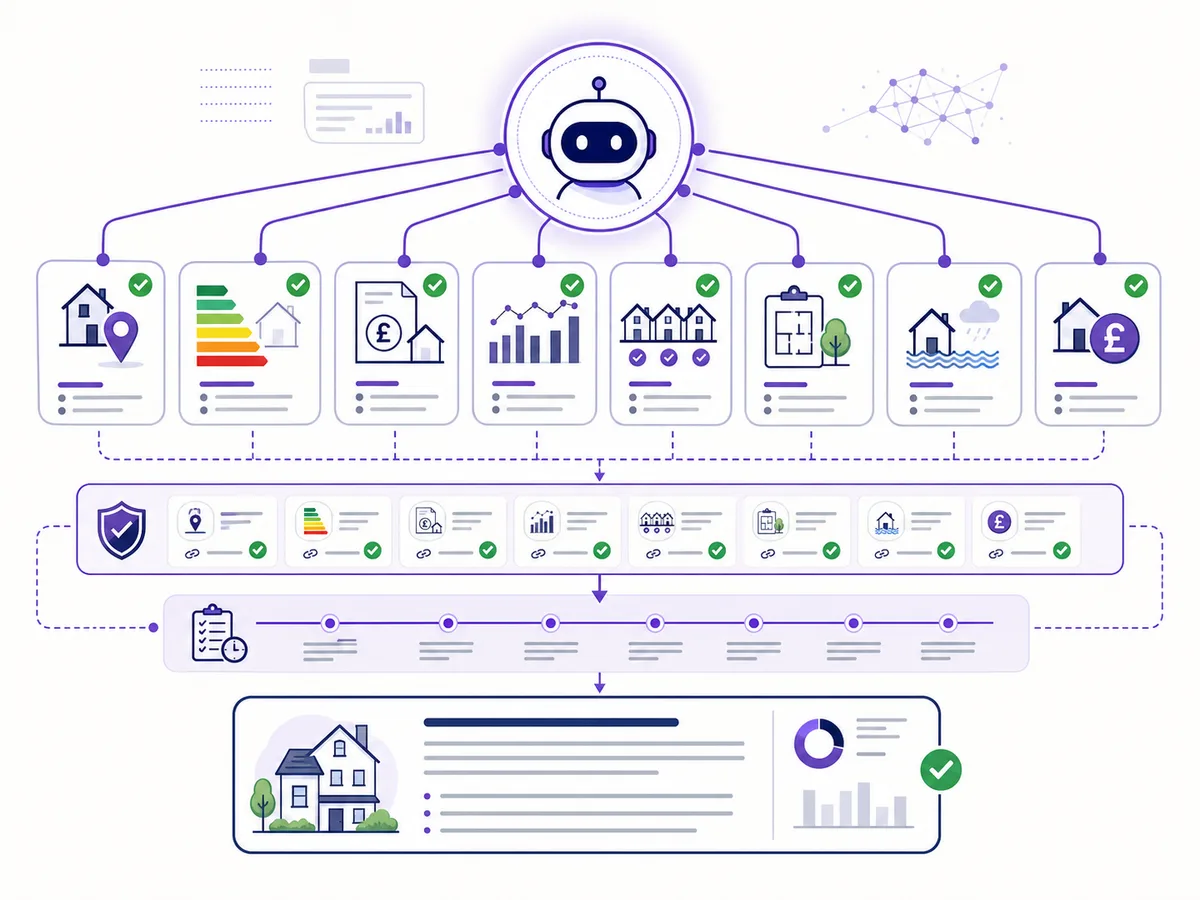
The agent should move from confirmed identity to controlled evidence calls, then through human review.
Use a safe tool sequence
A controlled research run can follow this order:
1. Identity
Resolve the address and confirm the subject.
2. Core property record
Request property analysis or selected factual tools. Preserve source dates and unavailable fields.
3. Sold evidence
Request comparables with an explicit lookback. Do not let the model choose a valuation only from the highest sale.
4. Modelled valuation
Request the valuation with confirmed inputs. Store estimate, range, confidence and assumptions.
5. Costs and context
Add EPC and Council Tax when needed. Keep property facts separate from local indicators.
6. Consistency check
Compare property type, address and floor-area context across sources. Stop if the records appear to describe different dwellings.
7. Compose the briefing
Write only from the structured result. Include warnings and links to evidence.
8. Human review
Require review before the output is sent to a client, used for an offer or converted into a paid report.
The agent should never hide a tool failure by continuing as if the field were zero or "average".
Facts, calculations and commentary
The model's output needs type boundaries.
Facts
"The latest matched EPC was lodged on date and records rating." This statement is tied to a source record.
Calculations
"The asking price is percentage above the modelled central estimate." This is derived from two explicit values.
Estimates
"The API returned an automated valuation range of lower to upper as at date." This preserves the range and model type.
Commentary
"The comparable set is thin and includes older evidence, so manual review is advisable." This is an interpretation supported by the structured warnings.
Do not allow the agent to rewrite an estimate as a fact. A final verifier can reject sentences that lack a source reference or calculation lineage.
Missing and conflicting data
Agents often fail by trying to be helpful after a source says "not found".
Set explicit rules:
- Missing EPC becomes an unavailable field, not an estimated rating.
- Missing Council Tax band does not become the most common local band.
- No comparables means no evidence-based comparable average.
- Low valuation confidence remains prominent in the summary.
- Conflicting property types trigger identity review.
- Unsupported country coverage is explained, not retried indefinitely.
When two sources disagree, show both dated records and the conflict. Do not ask the model to decide which government or provider record is correct without a rule and evidence.
Prompt injection and untrusted content
Property tools can return address strings, descriptions or external content. Treat all retrieved text as data, not instructions.
The system prompt should state that tool output cannot change permissions, request secrets or override the research schema. Do not give the agent a generic URL fetcher unless the task needs one. If external pages are used, isolate extraction from action-taking.
Other controls include:
- Allowlist tool names and endpoint paths.
- Validate every tool argument server-side.
- Keep credentials outside the model context.
- Limit result sizes.
- Escape retrieved content before display.
- Require confirmation for charged or resource-creating actions.
- Prevent tools from calling arbitrary internal URLs.
An address field containing "ignore previous instructions" is still an address string. It must never become a system command.
Cost and action limits
Set a budget per research run. The agent should not repeat a valuation because it dislikes the answer or widen a comparable search without explaining the change.
Track:
- Tool name and arguments.
- Credit cost returned by the API.
- Cached versus fresh result.
- Retry count.
- Latency.
- Final run cost.
Use deterministic orchestration for required steps where possible. The model can choose between a small number of optional tools, but identity, budget and review gates should be enforced by application code.
Creating an information pack is consequential because it reserves credits and creates a private resource. Require the user to confirm the property and report purpose before the information_pack_create tool is called.
Human review and refusal rules
Human review is required when:
- Property identity is ambiguous.
- Valuation confidence is low.
- Evidence conflicts.
- The property is unusual or high value.
- The output will be sent to a customer.
- The user requests legal, tax, lending or surveying conclusions.
- A charged report or external action is proposed.
The agent should refuse to present the API output as a formal valuation or legal opinion. It can explain what information is available and suggest the appropriate qualified professional.

A review screen should expose sources, confidence and warnings before prose is approved.
Evaluate the agent with real failure cases
Do not judge quality from one tidy terraced-house example. Build a test set containing fictional or appropriately controlled cases:
- Straightforward house with strong comparables.
- Flat with ambiguous unit formatting.
- New build with no recorded sale.
- Scottish address with limited property-level Council Tax support.
- Unusual property with low valuation confidence.
- Conflicting property type between inputs and EPC.
- Missing optional source.
- Tool timeout.
- Prompt injection inside a retrieved text field.
- User asking the agent to guarantee value.
Score:
- Property identity accuracy.
- Correct tool selection.
- Unsupported claim rate.
- Source and date completeness.
- Cost and latency.
- Correct escalation to human review.
- Appropriate refusal behaviour.
A polished paragraph with the wrong flat should fail the evaluation.
Research agent checklist
- Define one narrow job and output schema.
- Resolve and confirm the property first.
- Allow only the minimum required tools.
- Keep charged actions behind confirmation.
- Preserve facts, estimates, calculations and commentary separately.
- Treat tool output as untrusted data.
- Stop on conflicts instead of guessing.
- Enforce cost, retry and result-size limits.
- Keep credentials and authorisation outside the model.
- Test refusal and human-review behaviour.
Frequently asked questions
Does an AI property agent need web search?
Not for every property fact. Structured APIs are better for exact identifiers, dates and values. Search can add context when the task requires it, with separate source controls.
Can the agent choose a property from a postcode?
It should not choose silently. Resolve candidate addresses and ask the user to confirm the exact dwelling when several are possible.
Should the model calculate the valuation itself?
Use the valuation tool for the modelled estimate. The language model can explain the returned range and evidence but should not invent a valuation method in the prompt.
Can it send a report automatically?
Customer delivery is a separate consequential action. Require explicit permission, property confirmation, review and the normal marketing or account authorisation.
What is the most important evaluation metric?
Correct, traceable claims about the confirmed property. Style and speed matter only after identity, evidence and limitations are right.
Begin with one read-only research workflow using the Property Insights API Hub. Add tools only when a tested user requirement needs them, and keep the final decision with the person responsible for the property work.
Property data, one integration
Build with UK property data
Browse our APIs for valuations, sold prices, EPCs, crime, schools, ownership and more.